
Setup and best practices for Gigasheet's MCP server
Example API Call
curl --request POST \
     --url https://api.gigasheet.com/mcp \
     --header "X-GIGASHEET-TOKEN: $GIGASHEET_API_KEY" \
     --header 'content-type: application/json' \
     --data '{"method":"tools/list","params":{"protocolVersion":"2024-11-05","capabilities":{}},"jsonrpc":"2.0","id":0}'
Your LLM should issue this call, with your API key for $GIGASHEET_API_KEY as authentication. You may need to allow your LLM to wrap this in code, or see the setup instructions below.
How to Set Up in Claude
Prerequisites
- Ensure you have Python installed on your machine https://www.python.org/downloads/
- Generate a Gigasheet API key following these instructions: https://gigasheet.readme.io/reference/intro/authentication
- Install Claude Desktop from https://claude.com/download and log in to Claude
Set up the Gigasheet MCP
-
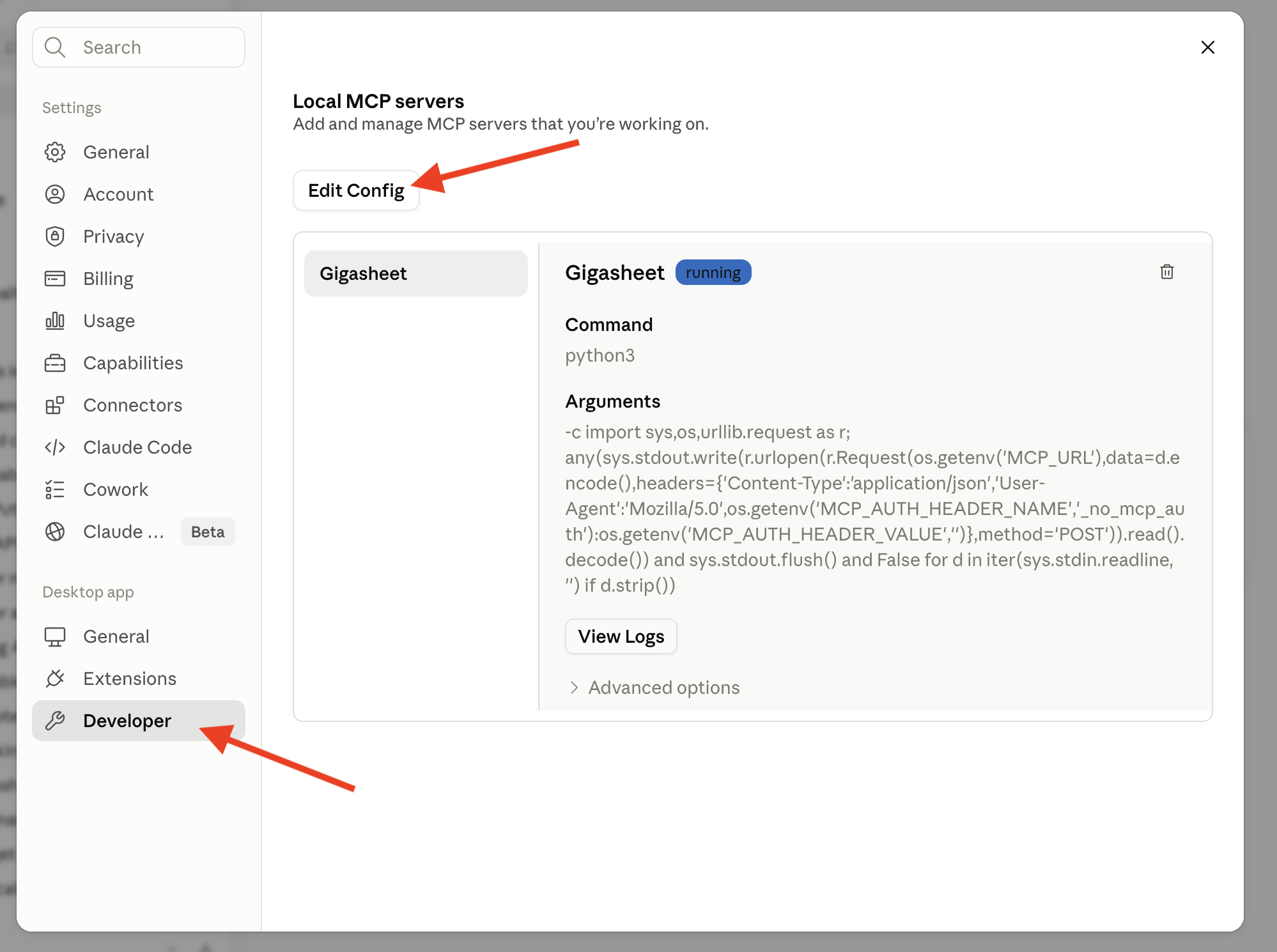
Open Claude and go to Settings
-
Go to Developer -> Edit Config
-
It will bring you to a text file, open that file in a text editor
-
Paste in this json (feel free to paste that into a Claude chat first and ask for a security review prior to editing your Claude config):
{ "mcpServers":{ "Gigasheet":{ "type": "stdio", "description": "Query Gigasheet for your data", "command": "python3", "args":[ "-c", "import sys,os,urllib.request as r; any(sys.stdout.write(r.urlopen(r.Request(os.getenv('MCP_URL'),data=d.encode(),headers={'Content-Type':'application/json','User-Agent':'Mozilla/5.0',os.getenv('MCP_AUTH_HEADER_NAME','_no_mcp_auth'):os.getenv('MCP_AUTH_HEADER_VALUE','')},method='POST')).read().decode()) and sys.stdout.flush() and False for d in iter(sys.stdin.readline, '') if d.strip())" ], "env":{ "MCP_URL": "https://api.gigasheet.com/mcp", "MCP_AUTH_HEADER_NAME": "X-GIGASHEET-TOKEN", "MCP_AUTH_HEADER_VALUE": "xxxx" } } } } -
Replace the “xxxx” with your Gigasheet API key
-
Save and close the text file
-
Restart Claude Desktop
-
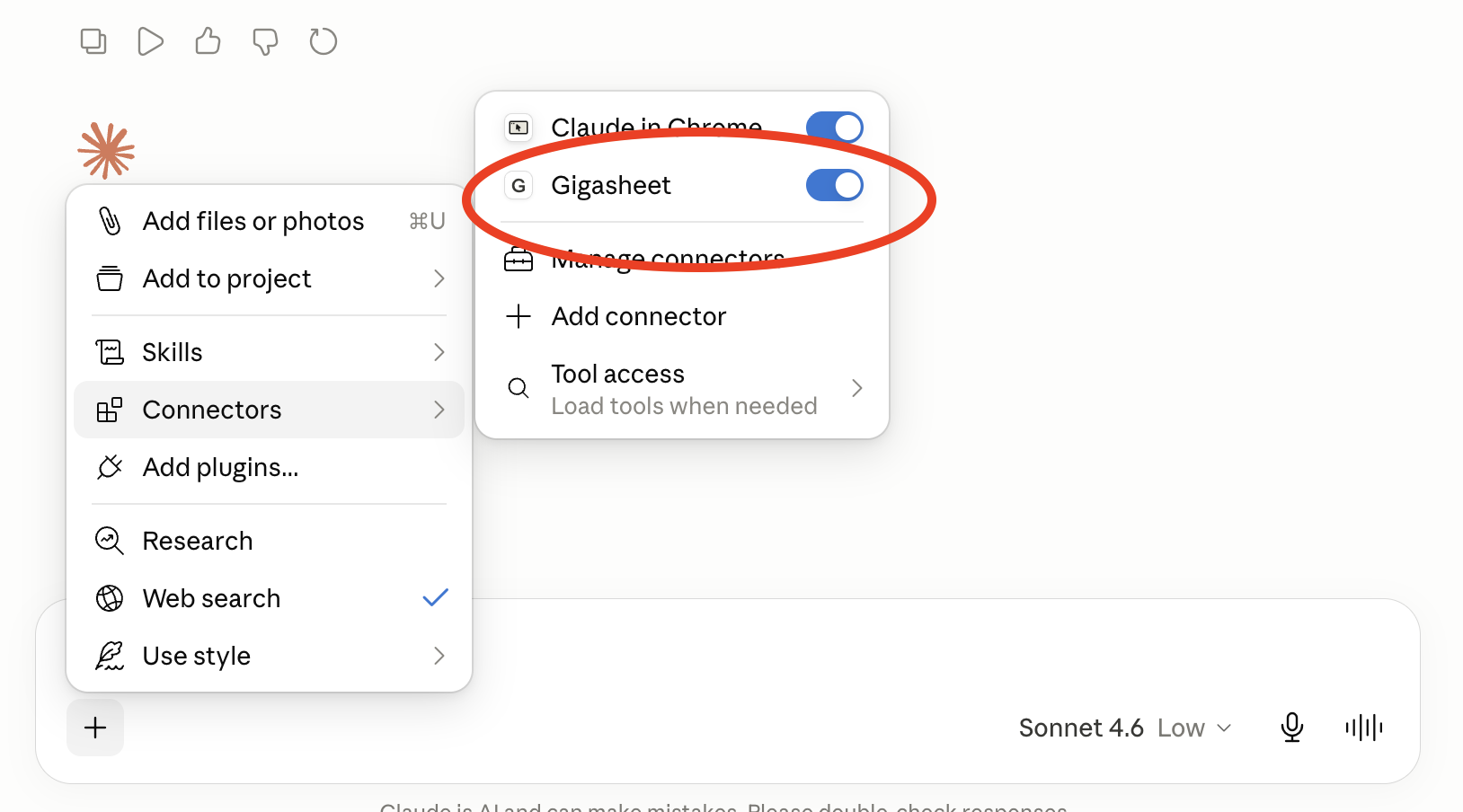
Confirm that Gigasheet is enabled in Connectors
-
Run a test question like "how many rows in this sheet"

Best Practices
When using the Gigasheet MCP keep these tips in mind to improve results and reduce multiple turns:
- SORT direction must be "ASC" or "DESC"
- AGGREGATE function call must be like func(col) or func()
- Repeated FILTER creates an AND
- AGGREGATE other than default count() requires SORT to be set
- ROWGROUPBY without aggregation implies count() desc, so you should omit sort, or specify a different column with AGGREGATE'
- Filters ignore case for contains operator and other fuzzy filter types, but equals filter is case sensitive